Waking up the robots...
Fetching your gear.

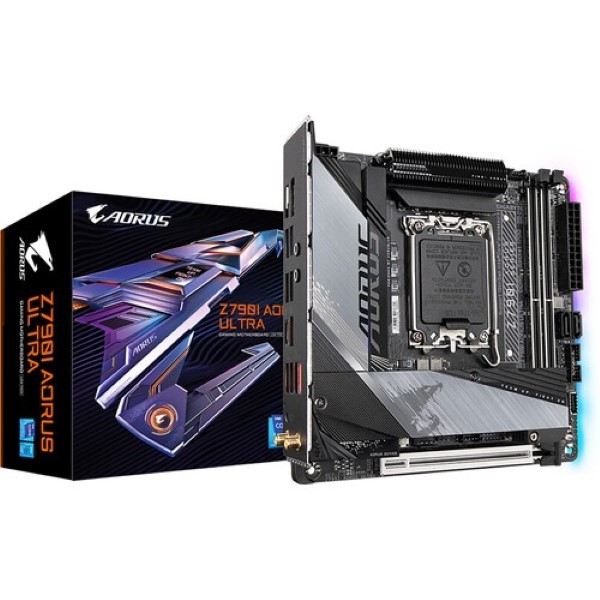
SKU: Z790I Aorus Ultra
users viewing this item right now

Maximizing performance across your entire system, the Z790I AORUS ULTRA leverages a unique electrical layout leveraging 10 VCORE, 1 VCCGT, and 2 VCCAUX Phases with 105A Power Stage to enhance multi-core CPU performance. PCIe 5.0 x16 bandwidth provides you with up to 128 GB/s transfer speeds, ensuring quick and efficient graphics bandwidth. DDR5 RAM slots can handle extreme memory speeds up to 8000 MHz with XMP capabilities. Perf Drive is a suite that enables you to adjust different levels of performance so you can optimize your experience.
Despite its small size, the Z790I AORUS ULTRA can remain cool even during heavy loads. A fully covered thermal design keeps the various components safe from heat buildup, while M.2 Thermal Guard III, Hybrid PCH, and M.2 heatsink work alongside the aluminum baseplate to dissipate heat efficiently from all angles. The 12-layer copper PCB ensures cooler performance and passively dissipates heat. Smart Fan 6 enables you to fully customize your experience with precision control.
Between the internal headers and the back panel, you have a litany of ports used for various scenarios and peripherals. USB 2.0 ports are for low-powered devices such as mice and keyboards. USB 3.2 Gen 1 and Gen 2 ports offer support for powered devices and data transfer rates up to 5 and 10 Gb/s, respectively. A single USB-C 3.2 Gen 2x2 port gives you up to 20 Gb/s speeds, ideal for high-powered devices such as audio interface.
Hi-Res Audio certification ensures the AORUS ULTRA is capable of reproducing frequencies up to 40 kHz or above for enhanced quality. Realtek HD audio codec supports high-end audio with a smart headphone amp which automatically adjusts impedance for clear sound.
UEFI BIOS and Gigabyte Control Center work together so you can adjust various parameters of your system with ease. Overclock your software with a simplified BIOS menu and make other fine adjustments to performance and RGB colorization.
Update the firmware of your system easily with the Q-Flash button. Download and save the new BIOS to a flash drive and connect the motherboard to the power supply and you are ready to apply the latest updates with ease.
No reviews yet for this product.
No questions have been answered yet.
You might also love these hardware gear upgrades
Waking up the robots...
Fetching your gear.