

Waking up the robots...
Fetching your gear.

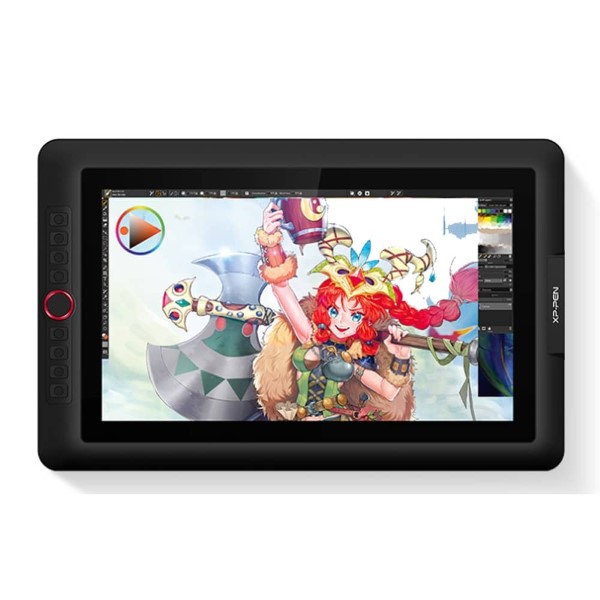
SKU: Artist 15.6 Pro
users viewing this item right now


Professional Display Makes Masterpieces.
A Red Dial interface that looks and performs at its finest.
The innovative Red Dial interface, breaking through the traditional pen display design and built for a smooth workflow and optimal efficiency. It fits comfortably in your hand and can be programmed to zoom in and out on your canvas, scroll up and down, and more, giving you the power to be exceptional in digital creative expression.Just design directly on the XP-Pen Artist 15.6 Pro’s digital medium monitor surface! Get the full power of a pen display in a portable sleek, smart design. Draw and create anything creatively, naturally, and intuitively!

|

|

|
|---|---|---|
120%sRGB (88%NTSC) Color GamutXP-PEN Artist15.6 Pro pairs a superb color accuracy of 120% sRGB (88%NTSC) with 178 degrees of visual angle and delivers rich colors, vivid images, and dazzling details in wider view. Your artworks will look more natural and colorful. |
Adopting Full-laminated TechnologyArtist15.6 Pro adopting full-laminated technology, seamlessly combines the glass and the screen, to create a distraction-free working environment that's also easy on the eyes. Presenting lowest parallax, strokes will be more accurate, providing you an immersive drawing environment. |
Supports ±60 Degrees of Tilt FunctionThe XP-Pen Artist 15.6 Pro supports 60 degrees of tilt function, allowing it to easily and quickly sense the gesture movement of the stylus to ensure accurate imitation of a real tilting brush effect, delivering smoother and more natural transition between lines and strokes. You will enjoy a more naturally familiar drawing experience than ever before. |

|

|

|
|---|---|---|
A Red Dial interface and 8 Customizable Shortcut KeysCompared to the Artist 15.6,the Artist 15.6 Pro features 8 fully customizable shortcut keys and puts more customization options at your fingertips to suit you preferred work style, allowing you to capture and express your ideas easier and faster for optimized workflow. It also features a slim 11mm profile, and with an easily accessible smart screen-brightness button, you can easily adjust it to your preferred brightness for comfortable drawing. |
Anti-glare Film that already applied on the screenThe XP-Pen Artist 15.6 Pro comes with a replaceable anti-glare optical film, featuring high transparency and scratch resistance and reduces glare while keeping your screen crisp and clear even bright light. |
Accessories Perfectly MatchedIncluded with the Artist 15.6 Pro, the AC 41 easy-to-use stand is built to prevent shaking or sliding as well as relieve eye fatigue and hand stiffness. The multi-function Pen Holder keeps your pen and pen nibs safe, and doubles as a pen stand or pen holder. |

No reviews yet for this product.
No questions have been answered yet.
You might also love these hardware gear upgrades
Waking up the robots...
Fetching your gear.