Waking up the robots...
Fetching your gear.

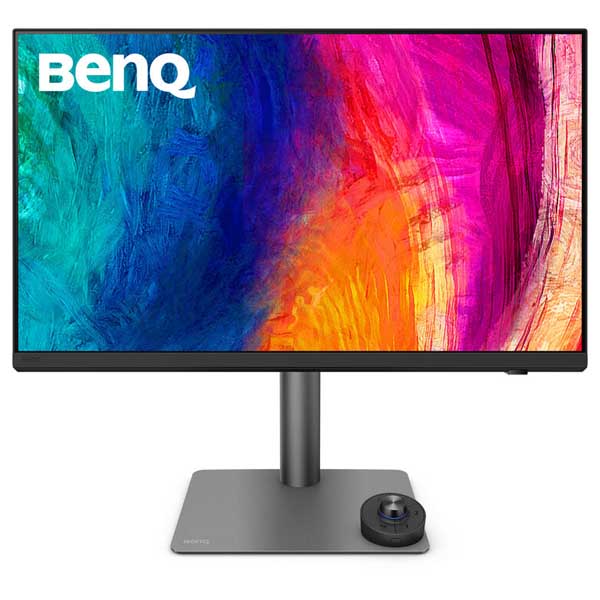
SKU: PD2732U
users viewing this item right now
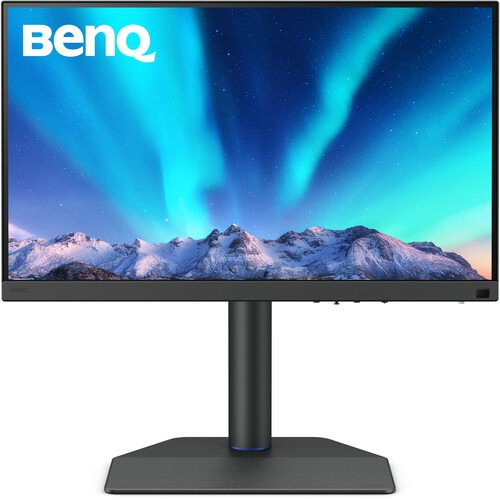
Connect this display to your Thunderbolt 4 compatible device to transfer video, data, and up to 90W over a single cable, with the support for daisy-chaining multiple monitors. DisplayPort 1.4 and HDMI 2.1 ports are also available. Use the integrated USB 3.2 Gen 1 hub to connect up to 5 Gb/s compatible devices through the monitor. Additionally, the wireless Hotkey Puck G3 controller allows you to quickly switch the display settings as needed for various projects. Use the customizable Display Pilot 2 software to efficiently adjust your monitor's settings with your mouse. It may also be used to help organize your workflow with preset templates for multi-windows browsing, a MacBook synchronized focus mode, application shortcuts, and more.
Colo Accuracy
Factory calibrated for Delta E ≤ 2 accuracy, the 27" IPS panel delivers cinematic visuals with 1.07 billion colors with 99% DCI-P3, 99% AdobeRGB, and 100% sRGB coverage. HDR10 support, with a 1000:1 static contrast ratio and 400 nits brightness, enhances images with realistically bright highlights and deep shadows.
BenQ AQCOLOR
benq's AQCOLOR ensures accurate color reproduction, delivering out of the box color precision , corner-to-corner uniformity, and a factory calibration report for further authentication. The PD2732U is Pantone certified and Calman verified for guaranteed industry-leading color accuracy and true-to-life color reproduction.
Nano Matte Black Panel
Get enhanced visual performance with the Nano Matte Black panel, which provides improved black depth, anti-glare technology, anti-reflection technology, and reduced highlight diffusion.
Hotkey Puck G3
The included Hotkey Puck G3 allows you to control the OSD remotely and cordlessly. Supporting up to three compatible monitors at once, the Hotkey Puck G3 includes an information key that shows the current color data, including the brightness, white point, Gamma, and Gamut values, which benefits users who work with different color settings.
M-Book Mode
M-Book mode minimizes the visual differences between the display and a connected MacBook laptop, which enables easy color matching. iDevice Color Sync ensures designers view the exact same colors of their work on Apple devices. The iKeyboard Control feature enables the monitor to sync with MacBook Control to operate the two as if they were a single system.
Daisy Chaining
A 15W Thunderbolt 4 out port allows you to daisy chain additional PD2732U monitors and other devices.
Rich Connectivity
Connect up to 5 Gb/s compatible storage drives and other devices with the built in hub, which includes one USB-C and three USB-A downstream ports.
| Specification | Details |
|---|---|
| Display Size | 27" |
| Panel Type | IPS-Type LCD |
| Aspect Ratio | 16:9 |
| Native Resolution | 3840 × 2160 (4K UHD) |
| Maximum Brightness | 400 nits / cd/m² |
| HDR Support | Yes |
| Contrast Ratio | 1000:1 |
| Response Time | 5 ms |
| Refresh Rate | 60 Hz |
| Color Support | 1.07 Billion Colors |
| Color Gamut | 99% Adobe RGB, 99% DCI-P3 |
| Viewing Angle (H × V) | 178° × 178° |
| Curved Display | No |
| Touchscreen | No |
| A/V Inputs | 1 × HDMI 2.1, 1 × DisplayPort 1.4 |
| USB I/O | 1 × USB-A 3.2 Gen 1, 2 × USB-C 3.2 Gen 1, 2 × USB-C (Thunderbolt 4) |
| Multi-Input Support (PIP/PBP) | No |
| Input Power | 100–240 VAC, 50/60 Hz |
| VESA Mounting | 100 × 100 mm |
| Weight | 18.87 lb / 8.56 kg |
| Warranty | Limited 3-Year Manufacturer Warranty |
No reviews yet for this product.
No questions have been answered yet.
You might also love these hardware gear upgrades
Waking up the robots...
Fetching your gear.